

You can export a catalog as often as you like. LotJitsu never rebuilds a package on its own: after you change a catalog, export it again to get a new package. Lots you have already exported, and have not added photos to since, are always free to export again.
What counts toward your allowance
Your plan includes a number of lots you can export each month. A lot counts when it goes into a package with a photo it did not have the last time it counted. So:
| What you did since the last export | Lot counts again? |
|---|---|
| Nothing | No |
| Edited a title, description or any other field | No |
| Changed the lot number | No |
| Rotated or reordered photos, or chose a new Cover Photo | No |
| Removed a photo | No |
| Added a photo, or replaced one | Yes |
| Added a new lot | Yes, the first time it is exported |
| Imported lots from a package | Yes, imported lots are new lots |
- A lot counts when the build finishes. A failed build counts nothing.
- Exporting the same content twice counts it once.
- Even when your monthly limit is used up, a package of unchanged lots still exports.
Steps
- Make your changes in the catalog.
- Start the export the same way as the first time. See Export a catalog on your computer or Export a catalog on your phone.
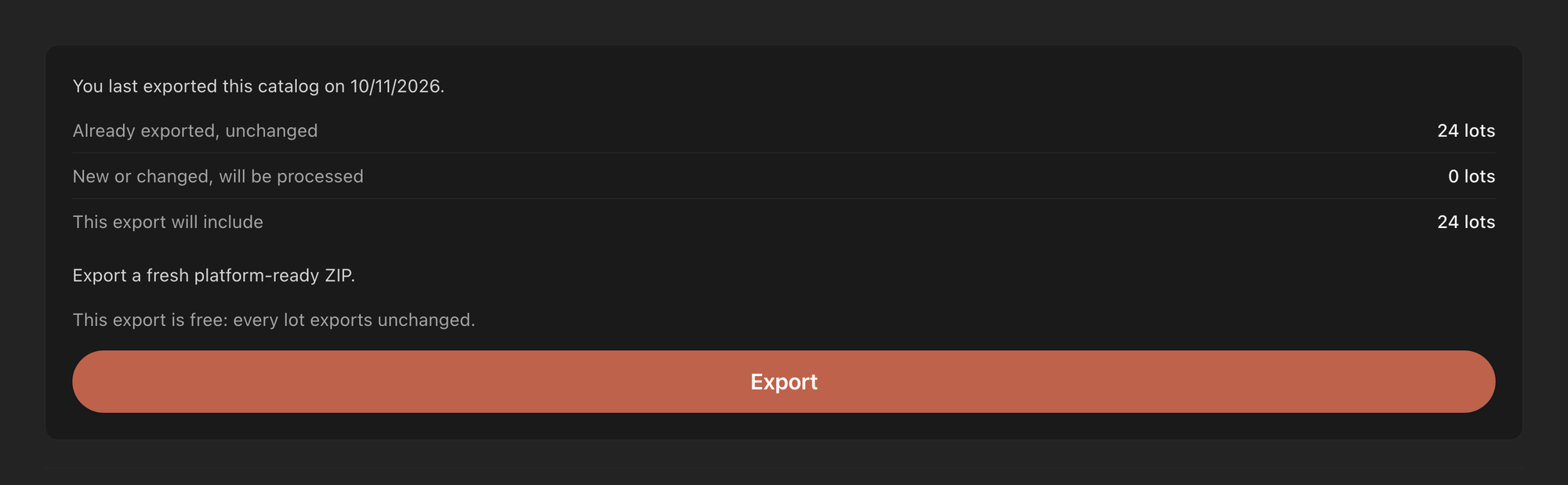
- Before you start the build, read the summary. It begins "You last exported this catalog on" and the date, then lists:
- Already exported, unchanged: lots that cost nothing this time.
- New or changed, will be processed: lots that count toward your allowance this time.
- This export will include: every lot that goes into the new package.
- Read the line under it. It says "This export is free: every lot exports unchanged." or "This export will count N of your remaining M lots this month."
- Click or tap Export and download the new package when it is ready.
Good to know
- On a computer, the summary adds "This catalog has changed since that export, so the package is out of date." when anything changed. On your phone it adds "Nothing has changed since that export." when nothing did.
- Your earlier package is not replaced. It stays in History, where you can download either one.
- Lots you deleted, and lots you took out of the export when you resolved Possible Duplicate Lots, are not in the new package.
- If the export needs more lots than you have left this month, the export is held. Wait for your monthly reset, or manage your account at lotjitsu.com.
- Before you upload the new package to a sale that already has these lots, check how your platform treats a lot number that's already there.

