

Platforms
Built for the platform you already sell on.
You photograph the lots. LotJitsu writes the title and description from your photos. It formats the spreadsheet, renames every photo the way your platform wants it named, and hands you one ZIP file.
You upload that ZIP yourself, on the same platform import page you use today. LotJitsu organizes your file for you.
Photograph, check, upload.
Catalog the lot
Take the photos on your phone. Set the lot number, or let LotJitsu read it off the sticker in the photo. It writes the title and description from the photos. Review it, change anything you want, save.
Run the health check
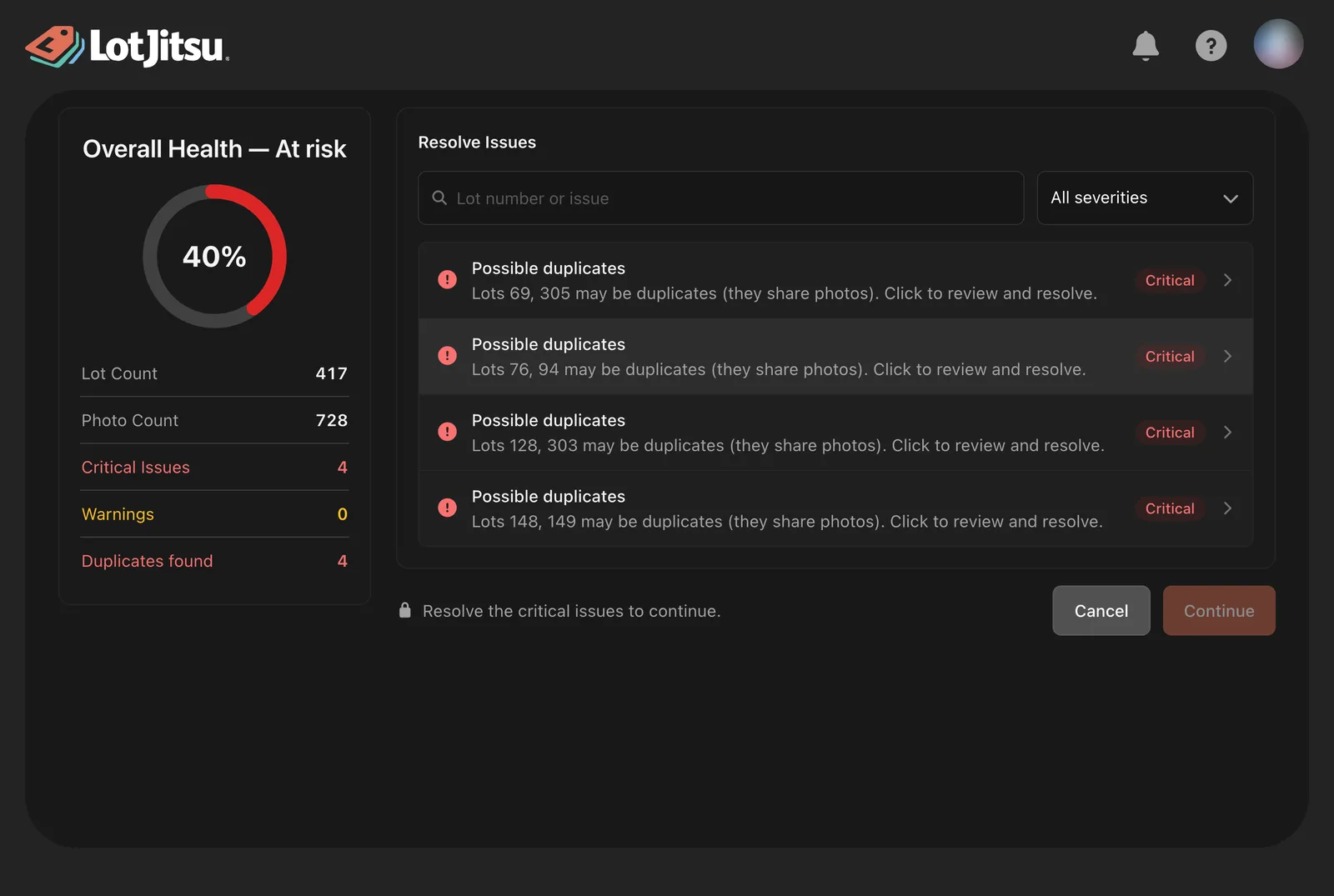
Before it builds the export file, LotJitsu reads the whole sale and tells you what your platform will reject.
Download and upload
LotJitsu builds a ZIP with the spreadsheet and every photo inside. You unzip it and upload it on your platform's import page.
LotJitsu does not sign in to your platform account. It does not post your sale. It builds the file package, and you decide when it goes live.
What you actually get when you press export.
A spreadsheet formatted for your platform
Your lots in lot number order, your fields in the columns that platform asks for, and only the fields you chose to collect.
Every photo, renamed
Each platform matches photos to lots by filename. LotJitsu does the renaming for you, in each platform's format, with the photo you chose to lead the lot labeled first.
A file that opens correctly in catalog platforms
The spreadsheet is written the way catalog platforms expect to read it. This ensures lot information appears in your catalog as written, avoiding errors after the import.
Four platforms, one process.
You pick the destination platform when you create the catalog. From that point on, LotJitsu collects the fields that platform needs, holds your titles to that platform's character limit, and names your photos in that platform's format.
HiBid and AuctionFlex
Photos come out as 1-1.jpg, 1-2.jpg, 2-1.jpg. Titles are held to 50 characters.
LiveAuctioneers
Photos come out with an underscore, as 1_1.jpg, 1_2.jpg, 2_1.jpg. Titles are held to 49 characters.
Find the problems here, not on the upload page.
A rejected import file is an hour you will not get back. LotJitsu reads the whole sale before it builds anything and tells you what is wrong, lot by lot.
- Required fields you left empty
- Titles and other values that are too long for that platform
- Photos that never got attached to a lot
- Lot numbers that conflict with each other
- Lots that look like duplicates, found by comparing photos across the sale
Each problem links straight to the lot so you can fix it and move on.
One photo of a drum kit.
From a single photograph, LotJitsu wrote the title "Vintage Tom & Snare Drum Pair", 29 characters, comfortably inside HiBid's 50 character limit.
The description got the details right: 1960s American manufacture, an orange sparkle wrap with a black stripe, chrome claw-hook lugs, a bead-rolled snare rim.
That is the part that matters. LotJitsu works from your photos. If there is a question, it says so, and you decide what to do about it.
Where the line is.
LotJitsu does not upload for you. There is no connection to your platform account, no posting, no scheduling. You download the package and you upload it.
LotJitsu writes your title and description. Not the whole listing. Category and estimates are optional extras on some platforms. Every AI field is editable, can be regenerated, and can be switched off completely for any field.
LotJitsu works from your photos. It does not search the internet, look up past sale prices, or authenticate anything.
An estimate is a starting point you set. It is not an appraisal and it is not a valuation.
Install the app and get started today.
LotJitsu works seamlessly across mobile and desktop.

