

Every catalog is built for one platform. The platform decides which fields your lots can have and which of them are required. You choose both when you create a catalog, and you can change them later in Catalog Settings, on your phone or your computer.
LotJitsu does not connect to any platform. It builds an export package in that platform's format, and you upload the package yourself.
The platforms
AuctionNinja, HiBid, LiveAuctioneers and Proxibid. Pick the one you will upload this catalog to.
The field list
Under Include Fields you see one row per field the platform accepts.
- The tick. A ticked field is collected on every lot in the catalog.
- required. The platform will not accept a lot without this field, so it is always ticked. Required fields are listed first.
- The Auto pill. Only fields LotJitsu can write carry it. Turn it on and LotJitsu writes that field from the lot's photos. Turning Auto on also ticks the field; unticking a field turns its Auto off. A required field can have Auto off if you prefer to type it.
- N more fields. Less common fields are tucked behind this row. Tap or click it to show them, and Show fewer to hide them again.
Title is the platform's main lot name (some platforms call it Lead). Lot Number is never in this list: every catalog has it, and you set it on each lot.
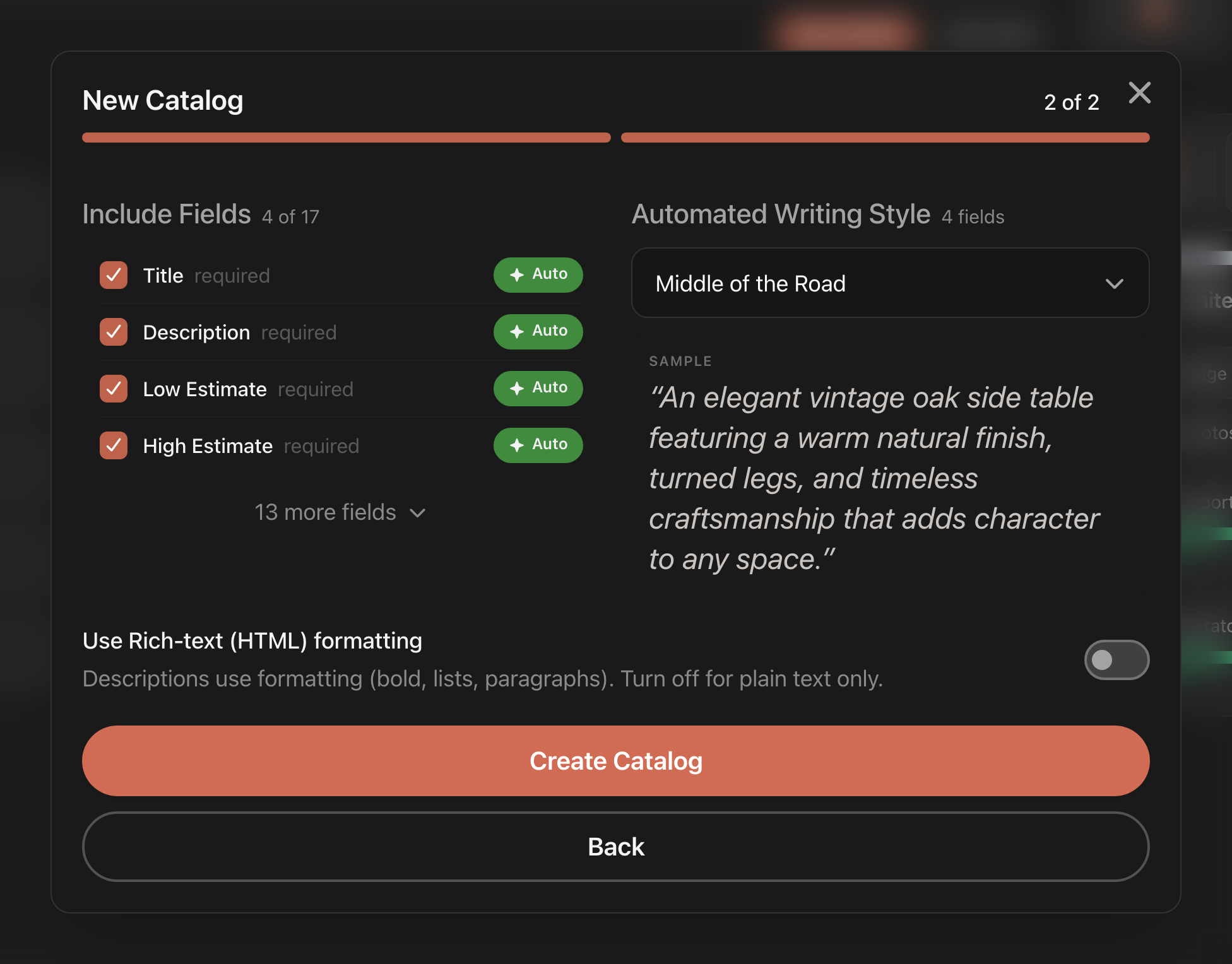
What each platform offers
| Platform | Required | LotJitsu can write (Auto) | Other fields you type |
|---|---|---|---|
| AuctionNinja | Title | Title, Description, Category | Client (Consignor), Condition, Tags, Starting Bid |
| HiBid | Title, Description | Title, Description, Category, Low Estimate, High Estimate | Consignor Code, Quantity, Starting Bid, Reserve |
| LiveAuctioneers | Title, Description, Low Estimate, High Estimate | Title, Description, Low Estimate, High Estimate | Starting Price, Condition, Reserve, Consignor, Quantity, Height, Width, Depth, Dimension Unit, Weight, Weight Unit, Buy Now Price, Exclude From Buy Now |
| Proxibid | Title, Description | Title, Description, Category | Starting Bid, Reserve, Quantity, Consignor |
A new catalog starts with the platform's required fields plus Title and Description, with Auto on for each of them that LotJitsu can write. Add anything else you need.
Character limits and photo limits differ by platform. The lot editor shows a counter on fields with a limit. See Platform reference.
Changing the platform later
You can switch a catalog's platform in Catalog Settings. There is no confirmation, and saving does this:
- The field list resets to the new platform's required fields plus Title and Description. Tick any other fields again.
- Nothing your lots already hold is deleted. Fields the new platform shares keep their values. Fields it does not have are hidden from the lot editor and the export, and come back if you switch back.
- Lots may now be missing something the new platform requires. The export's Overall Health check lists them. See Fix issues before you export.
Good to know
- Rich-text descriptions are available on every platform except HiBid, so the Use Rich-text (HTML) formatting switch does not appear on HiBid catalogs.
- Removing a field hides its values; it does not delete them. Tick it again and they return.

