

Using the LotJitsu app? See Share a folder or catalog on your phone.
Invite someone by email to work with you on a whole folder or on a single catalog. They join as a Collaborator once they accept.
Before you start
- You must be an Owner of the folder (or, for a catalog that is not in a folder, own the catalog). Anyone else can see who has access but cannot invite.
- Your plan sets how many collaborators you can have.
Folder or catalog?
- Share a folder to give access to every catalog in it, now and later.
- Share a catalog to give access to that one catalog only. The person can work on its lots but cannot export, delete or share it. See Owners and collaborators: who can do what.
Steps
- Find the people icon:
- on a folder's row (Manage collaborators when you point at it) or a catalog's row on the Catalogs page, or
- at the right of the name at the top of a catalog's page (Share this catalog with collaborators).
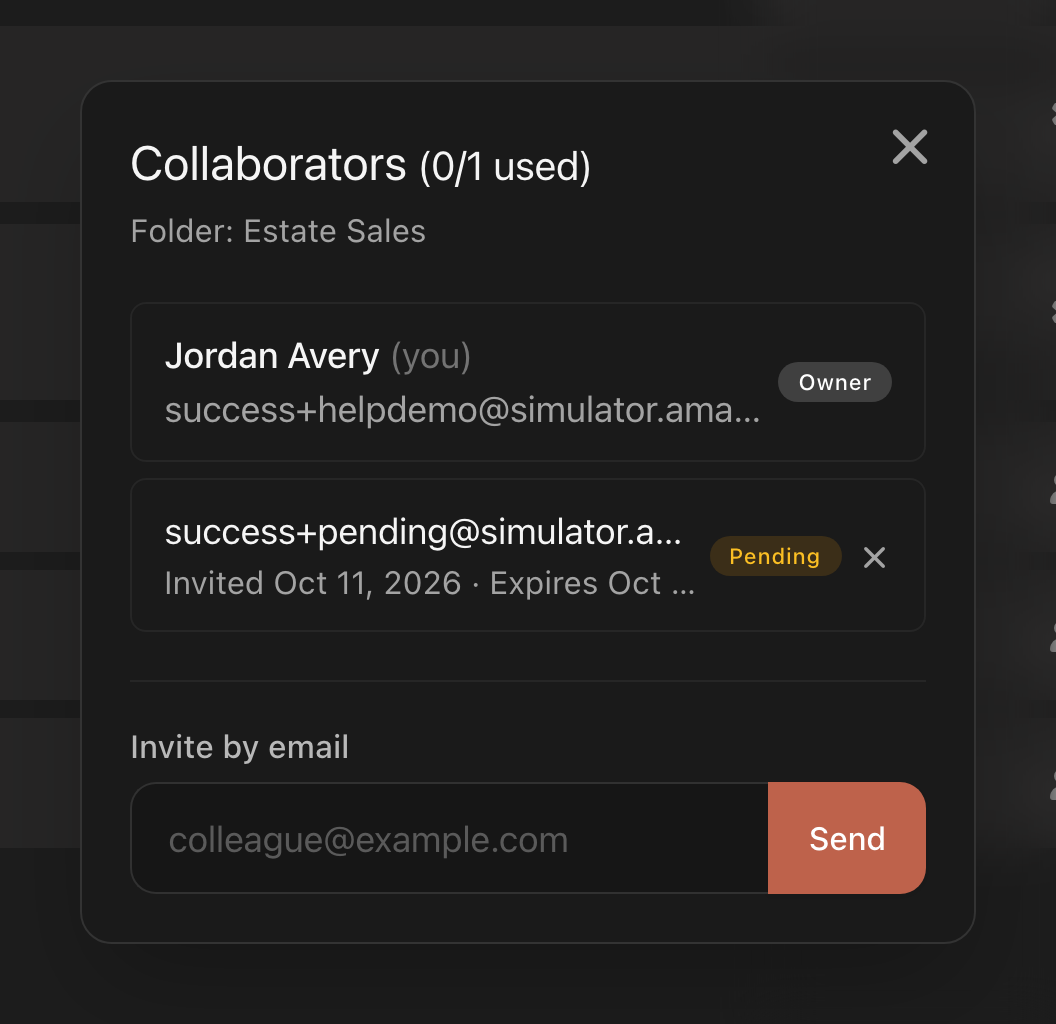
- Click it. The Collaborators window opens, with Folder: or Catalog: and the name under the title.
- Under Invite by email, type the person's email address.
- Click Send, or press Enter.
Invitation sent to the address appears, and the address joins the list with a Pending label and the dates it was sent and expires. The person gets an email, and if they already have a LotJitsu account, an alert as well.
Withdraw an invitation or remove someone
- Withdraw: click the X (Withdraw invitation) on a Pending row. There is no confirmation.
- Remove: click the X (Remove collaborator) on a person's row. Their access ends straight away and they are not told. There is no confirmation.
To make someone an Owner of a folder, or back to Collaborator, click the role label on their row (Owner or Collaborator). There is no menu; hovering over the label shows a tooltip, Promote to Owner or Demote to Collaborator, and clicking it changes the role straight away. See Owners and collaborators: who can do what.
Good to know
- The person must accept with the same email address you invited.
- An invitation lasts 14 days. An expired one shows Expired instead of Pending. To resend, withdraw it and invite the address again.
- If your plan has a collaborator limit, the title shows it, for example Collaborators (2/3 used). At the limit you see Your plan allows N collaborators. Remove a collaborator, or manage your account at lotjitsu.com. One person counts once however many things you share with them, and you never count.
- An invitation has already been sent to this email means a live invitation is already pending.
- Sharing a catalog with someone who already has it shows a message that they already have access.
- On a catalog inside a folder, the folder's members are listed too. Remove them from the folder's list, not the catalog's.
- The people icon gains a small share mark once others have access.

