

Using the LotJitsu app? See Accept or decline an invitation on your phone.
When someone shares a folder or catalog with you, you get an email and, if you already have an account, an alert. You answer with Accept or Decline.
Before you start
Log in with the exact email address the invitation was sent to. No account yet? Sign up on lotjitsu.com with that address first; the invitation will be waiting. See Create your account on lotjitsu.com.
Answer from the Catalogs page
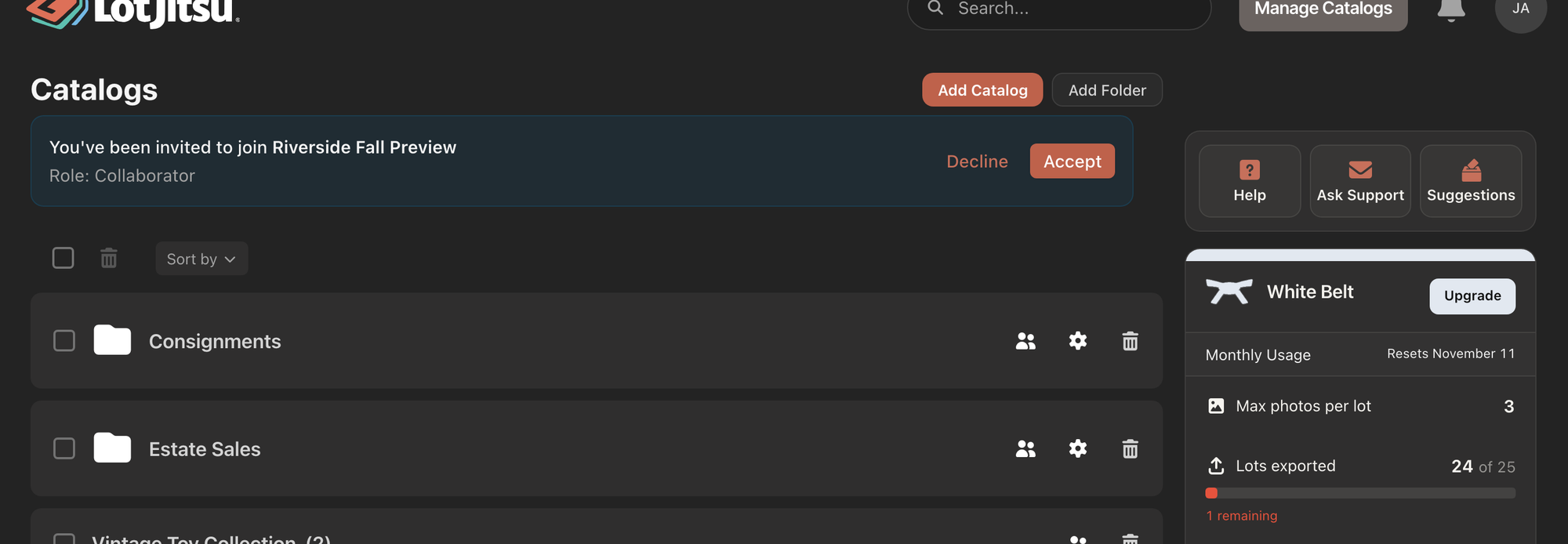
Open the Catalogs page. Each invitation shows as a banner above your list:
- A folder: You've been invited to join and the folder's name, with Role: Collaborator.
- A catalog: You've been invited to collaborate on and the catalog's name, with its folder's name beneath.
Click Accept or Decline.
Answer from Alerts
- Click the bell in the header.
- Click View All Alerts, or use the alert in the list that drops down.
- On the invitation alert, click Accept or Decline.
Answering in one place removes the invitation from both.
What happens next
- Accept: Joined and the folder's name, You can now collaborate on and the catalog's name, or Invitation accepted confirms it. The folder or catalog appears under SHARED WITH YOU on your Catalogs page. See Working in a shared catalog.
- Decline: Invitation declined confirms it. To change your mind, ask the person to invite you again.
If Accept does not work
- This invitation has expired: invitations last 14 days. Ask for a new one. Decline still clears the old banner.
- This invitation can't be accepted right now. The person who invited you has no room for more collaborators on their plan. Ask them to free a place, then click Accept again.
- No banner at all: check you are logged in with the invited address, and that the invitation was not withdrawn.
Good to know
- An alert for a catalog invitation reads, for example, "Sam Rivera invited you to a catalog".
- The invitation email's button reads Open Folder or Open Catalog. It opens your Alerts, or Sign Up if you have no account. A folder invitation explains that collaborators can add, edit and delete lots, and add and edit catalogs, in the folder.

